
ExitLag Integration
ExitLag is now built into the main TERA: Asura launcher. To enable route optimization, just turn on the checkbox in launcher settings.
Download the main launcher
A separate ExitLag archive is no longer required. The integration is already built into the main TERA: Asura launcher available on the download page.
Enable ExitLag in settings
Open launcher settings and enable the ExitLag checkbox. On the first enable, the driver is installed automatically, and no separate bat/cmd files are needed.

Launch the game
Launch the game through the main launcher as usual. You no longer need to select a separate ExitLag server in the server list.
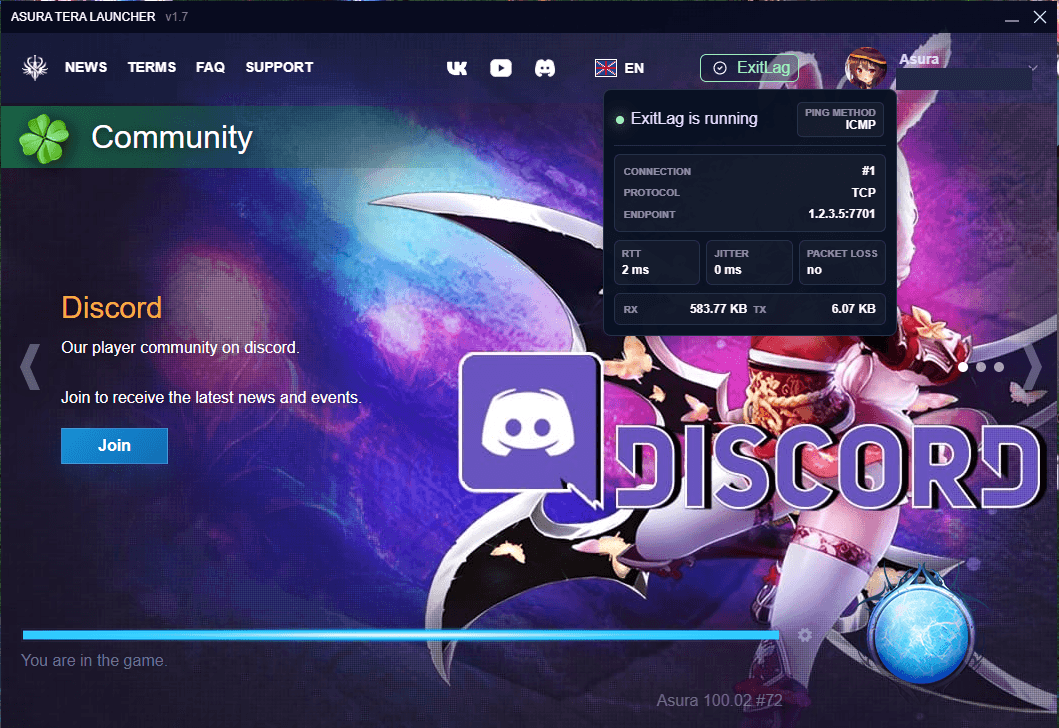
When the integration is running, the launcher top panel shows the ExitLag status and connection metrics. After that, just press the game launch button.
Troubleshooting
If the connection does not work, disable VPN rules for TERA.exe or TeraToolbox if you use a third-party VPN.
If network issues appear after enabling the feature, uncheck ExitLag in the launcher settings. The launcher will stop the integration and remove the installed driver automatically.
What is ExitLag
ExitLag uses multipath routing technology to optimize the connection and reduce latency in online games. In our integration it works directly inside the TERA: Asura launcher, without a separate app or manual route selection.
Lower ping
The launcher routes the connection through ExitLag paths and helps reduce latency to the game server.
Stable connection
Routing can reduce packet loss, latency spikes, and random network disconnects during gameplay.
ExitLag SDK integration is built into the main launcher. When the checkbox is enabled, the launcher installs the required driver, starts connection optimization, and shows the ExitLag status in the top panel. When the checkbox is disabled, the driver is removed automatically.